
A DVR (digital video recorder) is the recorder in an analog CCTV system. The cameras connect to it with coaxial cables, and the DVR converts their analog video into digital files, compresses them (usually H.264 or H.265) and saves them to a hard disk, so you can play back, export or watch the footage live on your phone.
There are three main types of DVR: standalone (embedded), PC-based and hybrid. Most DVRs sold today are standalone hybrid units that also accept a few IP cameras.
How does a DVR work?
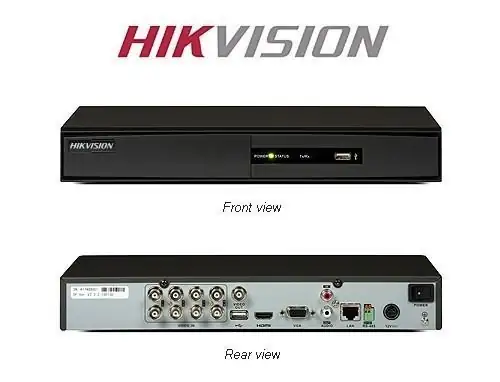
- Each camera sends an analog or HD-analog (HD-TVI, HD-CVI, AHD) signal over coaxial cable to one of the DVR's video inputs.
- The DVR digitises and compresses the video and records it to its internal hard disk, continuously or on motion.
- You watch live video and recordings on a monitor connected to the DVR, or over the network on a phone app or PC software.
What are the types of DVR?
| Type | What it is | Pros | Cons |
|---|---|---|---|
| Standalone (embedded) | A dedicated box with its own operating system and hard disk bays | Reliable, simple, low power, runs 24/7 | Fixed number of channels; repairs mean replacing the unit |
| PC-based | A capture card and recording software inside a computer | Easy to expand storage and upgrade | Needs PC maintenance and updates; more points of failure |
| Hybrid (XVR / tribrid) | A standalone DVR that accepts analog and HD-analog cameras plus some IP cameras | Upgrade camera by camera, reusing existing coaxial cable | IP channels are limited; IP cameras still need network cable |
Dahua calls its hybrid recorders XVRs; Hikvision's Turbo HD DVRs also take a number of IP cameras. Check the IP channel count in the model's specifications.
What is the difference between a DVR and an NVR?
A DVR records analog cameras over coaxial cable and does the video processing itself. An NVR (network video recorder) records IP cameras over network cable; the cameras process the video and can be powered through the same cable (PoE). For a new installation an NVR with IP cameras usually gives higher resolution and simpler cabling; a DVR makes sense when you want to reuse existing coaxial cabling. See DVR vs NVR for a full comparison.
How do I choose a DVR?
- Channels: pick 4, 8 or 16 inputs with a spare or two for future cameras.
- Camera compatibility: the DVR must support your cameras' signal type and resolution.
- Storage: hard disk size decides how many days are kept; use our hard disk calculator.
- Remote viewing: make sure the brand's phone app is current (Hik-Connect for Hikvision).
Our Package 1 is a Hikvision DVR system with 2MP cameras and a 1TB hard disk; see current packages and prices.
Frequently asked questions
- Can a DVR record IP cameras?
- Only hybrid DVRs (XVRs) can, and usually for a limited number of IP channels. For an all-IP system use an NVR.
- Does a DVR need internet?
- No. It records to its own hard disk without internet. You only need a network connection to view the cameras on your phone or PC.
- How long does a DVR keep recordings?
- It depends on the hard disk size, number of cameras, resolution and whether it records continuously or on motion. When the disk is full the DVR overwrites the oldest footage.
Want this done for you?
We supply and install CCTV, door access, video intercom and Wi-Fi systems across Singapore, from Hikvision, Uniview, Vstarcam, TP-Link, Ruijie and EZVIZ. Send a photo or floor plan and we will recommend a setup and a fixed price.