
You can run a Wi-Fi IP camera on its own, without a DVR or NVR. Put a microSD card in the camera for recording, power it on, install the manufacturer's app, then add the camera by scanning its QR code or entering its UID and send it your Wi-Fi details from the app. The camera streams to your phone through the maker's cloud (P2P) service, so port forwarding is not needed. Change the default password straight away.
How do I set up a Wi-Fi camera step by step?
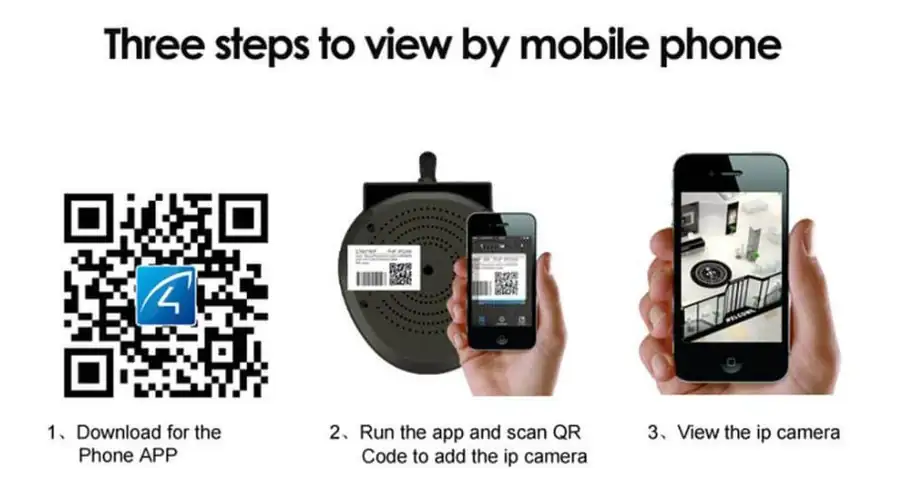
Using a Vstarcam camera and its Eye4 app as the example (other brands work the same way with their own app):
- Insert a microSD card while the camera is off, so it can record without a recorder.
- Power on the camera near your router for the first setup.
- Install Eye4 from the App Store or Google Play, register an account and log in.
- Tap + to add a camera. Scan the QR code on the camera's label, or type the UID printed on it.
- Choose wireless setup, select your Wi-Fi network and enter its password. The app sends the details to the camera; wait for the confirmation.
- Set a new camera password when prompted, then tap the camera to view it live.
- Mount the camera in its final position and check the live view still loads there.
Most Wi-Fi cameras only connect to 2.4 GHz Wi-Fi. Vstarcam notes that most of its models support 2.4 GHz only, so if your router combines both bands under one name and the setup fails, temporarily separate them or use the 2.4 GHz network.
What if wireless setup keeps failing?
- Plug the camera into the router with a network cable, add it in the app with Search in LAN, then set up Wi-Fi from the camera's settings and unplug the cable.
- Check the Wi-Fi password, and avoid special characters in the network name.
- Move the camera closer to the router or add a mesh point; thick walls weaken the signal.
- Reset the camera with its reset button and start again.
Do I need port forwarding?
Usually not. The app reaches the camera through the maker's P2P service using the UID. Port forwarding exposes the camera directly to the internet and increases the risk of hacking, so only use it if your camera has no cloud option, and then with a strong password and current firmware.
When should I add an NVR?
A memory card is fine for one or two cameras. An NVR with a hard disk keeps longer recordings in one place, survives a camera being stolen, and lets you view all cameras together. For several cameras, wired PoE cameras with an NVR are more reliable than Wi-Fi.
Want it set up for you? Our Vstarcam wireless package with a 64GB microSD card starts from S$159 for one camera; see current packages.
Sources
Frequently asked questions
- Can an IP camera record without an NVR?
- Yes, if it has a microSD card slot. It records to the card and you view live and playback in the maker's app.
- Where do I find the camera's UID?
- On the label on the camera body or box, usually next to a QR code. Vstarcam's support pages describe a 15-digit UID.
- Does a wireless camera work with 5 GHz Wi-Fi?
- Most only support 2.4 GHz. Some newer models support both bands; check the model's specifications.
Want this done for you?
We supply and install CCTV, door access, video intercom and Wi-Fi systems across Singapore, from Hikvision, Uniview, Vstarcam, TP-Link, Ruijie and EZVIZ. Send a photo or floor plan and we will recommend a setup and a fixed price.