In short
How line crossing, intrusion zone, enter area and leave area alerts work, which rule fits each spot on your site, and how to count cameras with SPF’s standard.
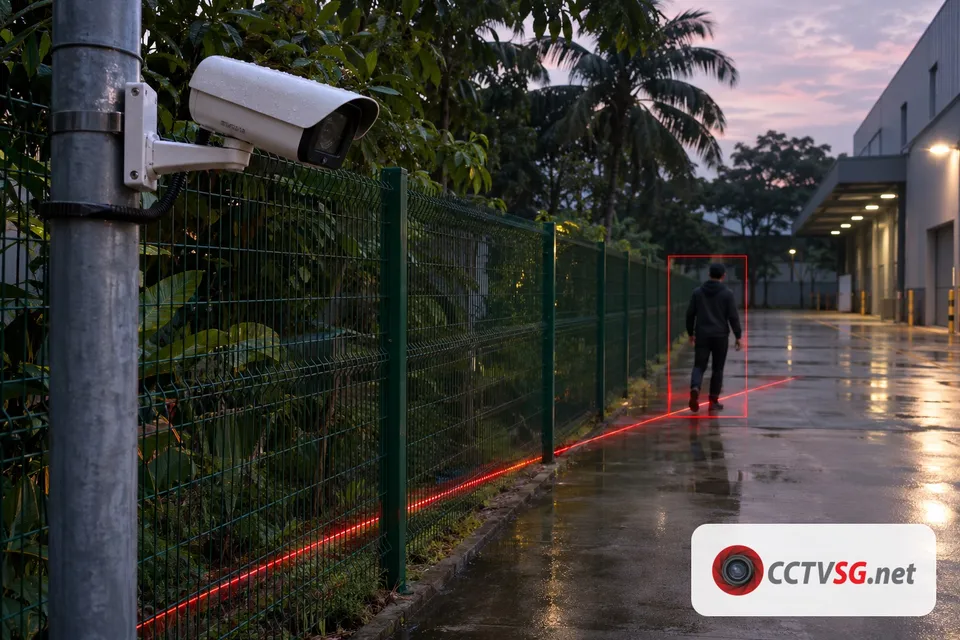
Perimeter intrusion detection CCTV is a camera system that alerts you when a person or vehicle crosses a line or enters an area you have drawn on the picture. Use line crossing where people should only move one way or not at all, such as a fence line, and an intrusion zone where nobody should be at certain hours, such as a yard at night. At CCTVSG.NET, both rules are in AI+ and AI Pro, and Enter Area and Leave Area are added from AI Pro.
Key Takeaways
- The rules are Cross Line, Intrusion, Enter Area and Leave Area. The time a target stays and the direction it moves decide which one you need.
- Where the rule is drawn matters as much as the AI. A zone that covers a public footpath will alert on lawful passers-by however good the AI is.
- The Singapore Police Force’s building standard asks for continuous camera coverage of the fence line at fenced sites, and gives millimetre-per-pixel figures you can use to count cameras.
- The same standard says cameras should not be the only protection. Pair alerts with locks, lighting and someone who responds.
- Arm by schedule. The same loading bay needs no alerts at 3 pm and strict alerts at 3 am.
What is the difference between line crossing and intrusion detection?
Line crossing is a tripwire: it fires the moment a target goes over a line, and you can limit it to one direction. Intrusion detection is a zone: it fires when a target enters the area and stays longer than a time you set. Hikvision’s recorder manual describes intrusion detection as detecting people, vehicles or other objects that “enter and loiter” in a drawn region, with a time threshold. That setting can explain missed alerts: somebody who runs through a zone in less time than the threshold may not trigger it.
| Rule (our name, Hikvision manual name) | What triggers it | Time threshold? | Direction? | Use it for |
|---|---|---|---|---|
| Cross Line Detection (Line Crossing) | Going over a drawn line | No | Yes: A to B, B to A, or both | Fence lines, one-way gates, back-lane walls |
| Intrusion Detection (Intrusion) | Entering and staying in a drawn zone | Yes | No | Yards, rooftops and pool decks after hours |
| Enter Area (Region Entrance) | Moving into a zone | No | Inward only | Server room doors, stores, restricted corridors |
| Leave Area (Region Exiting) | Moving out of a zone | No | Outward only | Exits, goods areas, places someone should not walk out of unnoticed |
The behaviour in the table follows Hikvision’s manual pages for line crossing, intrusion, region entrance and region exiting. Our AI Pro package uses Uniview, whose setting names and options can differ, so we set these up per model.
Which rule should you use? Three questions
Answer these in order for every spot you want to protect:
- Is anyone ever allowed here? If no one is, at any hour, use Cross Line at the boundary. If people are allowed at some hours, use a zone with a schedule, or a scheduled line at a wall.
- Is a quick pass a problem, or only staying? If one step inside is already a problem (a server room), use Enter Area. If people may cut across but should not linger (an open yard), use Intrusion with a time threshold.
- Does direction matter? If going in is fine but coming out is not, or the reverse, use Cross Line with one direction, or Leave Area.
Here is how those answers play out on common Singapore sites:
| Place | Rule | When it is armed | Package with that rule | Mistake to avoid |
|---|---|---|---|---|
| Warehouse or factory fence | Cross Line, inward | All day | AI+ and above | Drawing the line outside the fence, over the public road |
| Loading bay | Intrusion | After the last delivery until opening | AI+ and above | Leaving it on in working hours until staff mute the alerts |
| Condo pool or gym | Intrusion, humans | Closing hours only | AI+ and above | Including the path residents use to reach the lift |
| Landed home back lane | Cross Line on your own wall, inward | Night, or when away | AI+ and above | Covering the lane or a neighbour’s yard |
| Office server room | Enter Area, humans | Outside working hours | AI Pro and above | Relying on the camera instead of door access |
| Shop back door | Enter Area inside the door | After closing | AI Pro and above | Using plain motion detection, which also reacts to lights and insects |
For the difference between plain motion and human or vehicle filtering, see motion detection vs AI detection.
How many cameras does a fence line need?
Two checks decide this: whether the picture is detailed enough for a person to use as evidence, and whether the AI can work at that distance. The AI check depends on the model, so it comes from your installer. You can do the evidence check yourself. The SPF Video Surveillance System Standard for Buildings (version 2.0, March 2022) sets four levels of view and gives a scale for each: 40 mm per pixel to detect a person, 16 mm to observe, 8 mm to recognise and 4 mm to identify. It also lists video analytics, such as alerts for crossing a virtual tripwire, as an important tool near the perimeter. It is a set of recommendations, and it asks for comprehensive and continuous coverage of the perimeter fence line at fenced establishments, with common areas at the observe level or better.
We read each figure as the coarsest acceptable scale. Multiply the camera’s horizontal pixels by it and you get the widest scene the camera can show at that level, facing the scene square-on (rounded down). The lowest resolution in the chain counts, including the recorder and the screen:
| Camera (horizontal pixels) | Detect, 40 mm | Observe, 16 mm | Recognise, 8 mm | Identify, 4 mm |
|---|---|---|---|---|
| 2MP, 1080p (1,920) | 76 m | 30 m | 15 m | 7 m |
| 4MP (2,560) | 102 m | 40 m | 20 m | 10 m |
| 8MP, 4K (3,840) | 153 m | 61 m | 30 m | 15 m |
Most fence cameras look along the fence, so the limit is reach, not width. Reach = scene width ÷ (2 × tan of half the lens angle). For a 4MP camera at the observe level:
| Lens angle (horizontal) | Reach along the fence | Two cameras facing each other on 60 m |
|---|---|---|
| 90 degrees (wide) | 20 m | About 20 m in the middle falls below observe level |
| 50 degrees | 43 m | Covered, with overlap |
| 30 degrees (narrow) | 76 m | Covered by one, but with a blind strip near the pole |
Worked example: a 60 m rear fence at an industrial unit. Two 4MP cameras with lenses near 50 degrees, one at each end and facing each other, cover the fence at the observe level, and each can see the other’s pole, so tampering is recorded. The same two cameras with wide 90-degree lenses leave a gap, even though the camera count and megapixels are identical. Ask for the lens angle in every quote, and add a tighter camera at the gate, because identifying a face needs a 4MP scene no wider than about 10 m.
This is planning arithmetic for what a person can see on screen. It is not an AI detection range. Mounting height, light and rain also matter, so we check the actual model against your site plan.
How do you reduce false intrusion alerts?
The frame-edge, foot-line and walking-direction tips below follow OpenEye’s guide; check your own model’s manual too.
- Draw inside your own boundary. Keep the line or zone off pavements, roads and shared paths.
- Draw where feet touch the ground. Many systems test the bottom centre of the detection box, as OpenEye’s best practices explain. A line drawn halfway up a fence on screen is at the wrong depth.
- Keep away from the frame edge. The AI needs a moment to recognise a person before they reach the line.
- Let people walk across the picture. Movement across the frame is easier to track than someone walking straight at the lens.
- Filter by target and size. Select human or vehicle, and set the minimum size to help filter out cats and birds.
- Light the line. SPF’s standard recommends well-directed lighting that avoids glare. Rain, headlights and cobwebs across the lens at night are common nuisances, so add cleaning to your maintenance plan.
- Walk test it. Cross the line by day, at night and in rain gear. Try running and crouching, then adjust sensitivity.
What intrusion detection cameras cannot do
SPF’s standard says a video surveillance system “should not be designed to serve as the sole protective measure”. It should work with access control, intrusion alarms, fence sensors and a security response. An alert only helps if someone acts, so write down who receives it, who checks the clip, and who calls the police on 999. Use a physical fence sensor or a door contact as well when a break-in would be very costly, because a camera cannot see through smoke, a container or a wall.
Two features extend the perimeter. Climbing Detection and Long Stay (loitering) Detection, both in AI Pro, help where people scale a fence or wait around before acting.
PDPA points for perimeter cameras
Footage of identifiable people is personal data. The PDPC’s advisory guidelines say notices are good practice even where consent is not required, and that cameras in areas closed to the public may rely on the legitimate interests exception after a risk assessment. Paragraph 4.42 says incidental capture beyond your boundary is not prohibited, but the coverage should be reasonable for the purpose, so aim at your own land. Our PDPA guide for CCTV has a checklist. This is general information, not legal advice.
Which CCTVSG.NET package has intrusion detection?
| Package | Perimeter rules | Choose it when | Starting price |
|---|---|---|---|
| AI+ (Hikvision) | Cross Line, Intrusion, plus face recognition | You have one boundary or a simple after-hours zone | From S$980 |
| AI Pro (Uniview) | The above plus Enter Area, Leave Area, Climbing and Long Stay | You have a yard, several zones or vehicles to handle | From S$2,400 |
| AI Ultra (NVIDIA AI box) | All AI Pro rules plus site safety and crowd features | You have a larger or unusual site | Quote per site |
AI Lite, our EZVIZ wireless package, has human shape detection but not these rules. Every package comes with a 1-year onsite warranty. Compare them on the AI CCTV page. For building sites, see our construction site VSS guide.
Get a perimeter plan for your site
Send us a site plan or a few photos, mark the spots where nobody should be, and tell us the hours. We will suggest the rule, the camera position and the package for each spot. CCTVSG.NET has installed CCTV in Singapore since 2011. Request a quote or WhatsApp us.
Sources
- Singapore Police Force, Video Surveillance System Standard for Buildings, version 2.0 (March 2022), Foreword and sections 3.2, 3.4.5, 4.1 and 4.2: SPF Building Security page
- Hikvision, NVR user manual: Intrusion, Line Crossing, Region Entrance and Region Exiting Detection (linked above)
- OpenEye, Line Crossing Best Practices (linked above)
- PDPC, Advisory Guidelines on the PDPA for Selected Topics (revised May 2024), paragraphs 4.33 to 4.42 (linked above)
Frequently asked questions
- What is the difference between line crossing and intrusion detection?
- Line crossing fires the moment a target goes over a drawn line and can be limited to one direction. Intrusion detection fires when a target enters a drawn zone and stays longer than a set time.
- Which CCTVSG.NET package includes line crossing and intrusion detection?
- AI+ (Hikvision) and AI Pro (Uniview) both include Cross Line and Intrusion Detection. AI Pro adds Enter Area, Leave Area, Climbing and Long Stay Detection. AI Ultra includes all of them and is quoted per site.
- Why does my intrusion alert miss people who run past?
- Intrusion zones often have a time threshold. Somebody who crosses faster than that time may not trigger the alert. Lower the threshold, or use line crossing for that spot.
- Can intrusion detection cameras replace a security alarm or guard?
- No. SPF’s building standard says a video surveillance system should not be the sole protective measure. Use it with access control, alarms, lighting and someone who responds.
- How many cameras do I need for a 60 m fence?
- Plan two 4MP cameras facing each other with lenses near 50 degrees, which reach about 43 m each at SPF’s observe level of 16 mm per pixel. Wide 90-degree lenses reach only about 20 m and leave a gap. Add a closer camera at the gate.
- Can I set intrusion alerts for after-hours only?
- Yes. You set an arming schedule for each rule, so a loading bay can be quiet in working hours and armed after closing.
Want this done for you?
We supply and install CCTV, door access, video intercom and Wi-Fi systems across Singapore, from Hikvision, Uniview, Vstarcam, TP-Link, Ruijie and EZVIZ. Send a photo or floor plan and we will recommend a setup and a fixed price.