In short
How an AI fall detection camera spots a fall and alerts you, where it helps in Singapore homes, eldercare and workplaces, privacy rules and a set-up checklist.
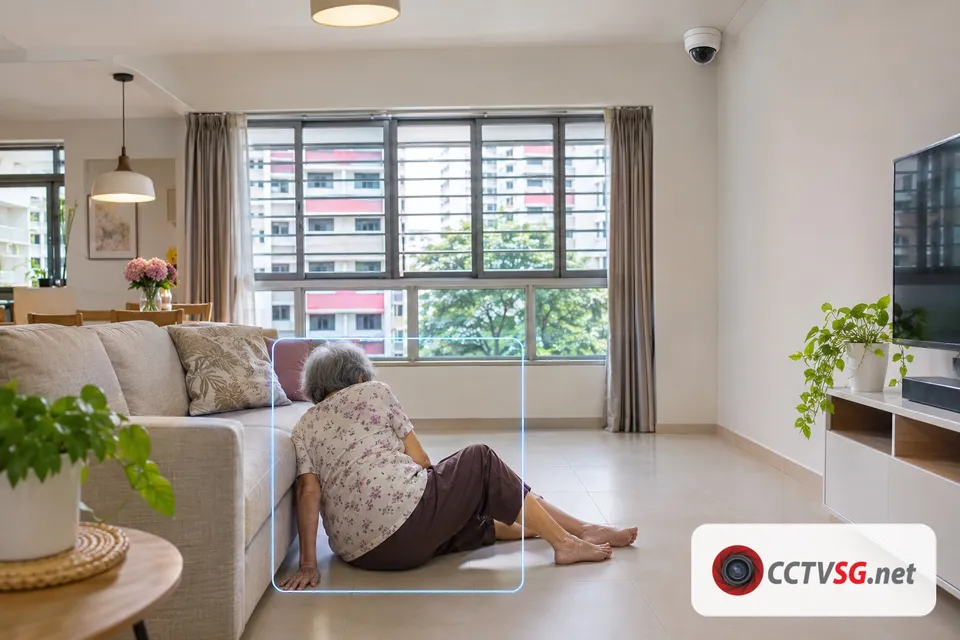
A fall detection camera is a CCTV camera with AI video analytics that recognises when a person falls and sends an alert to your phone app or control room, so someone can check at once. Nothing has to be worn or charged: the camera watches a fixed area such as a living room, a corridor or a warehouse aisle. At CCTVSG.NET, Fall Detection is part of our AI Pro and AI Ultra packages.
Key Takeaways
- Fall detection looks at body posture, not just movement, so it can tell a fall apart from someone walking past.
- A camera covers one area and needs no battery on the person; a wearable alarm goes everywhere but only works when it is worn and charged.
- Good uses in Singapore: an elderly parent at home in the day, common rooms and corridors in eldercare, and lone workers in warehouses and factories.
- Never place cameras in toilets, shower areas or where people change. Tell your domestic helper where cameras are, and tell staff why they are there, as MOM requires.
- Treat every alert as a prompt to check, not as a medical alarm. Results depend on the camera angle, the lighting and whether the person is in view.
What is a fall detection camera?
It is an IP camera, recorder or AI processing box running a fall detection algorithm. The AI follows each person in the picture. When a person goes from standing or walking to lying on the floor, the system raises a Fall Detection event, records the clip and pushes an alert to the people you choose.
This is different from basic motion detection, which only notices that pixels changed. Our guide on motion detection vs AI human and vehicle detection explains why AI events give far fewer false alerts from shadows, curtains or pets.
Fall detection camera vs wearable fall alarm
Many families first think of fall detection watches and pendants. A camera does a different job, and many families use both.
| AI fall detection camera | Wearable (watch or pendant) | |
|---|---|---|
| Needs to be worn | No | Yes, all the time |
| Charging | No battery on the person | Must be charged regularly |
| Coverage | The rooms or areas the cameras see | Wherever the person goes |
| What you get with the alert | A video clip, so you can see what happened | A call or message, usually without video |
| Privacy | Never in toilets, shower areas or a helper’s sleeping area | Works in private areas |
| Best for | Homes, eldercare common areas, workplaces | Going out, bathrooms, people who accept wearing it |
Where does fall detection help in Singapore?
- HDB flats and condos: an elderly parent at home alone while the family is at work. Cover the living room and the passage to the kitchen and toilet, so a fall on the way is seen even though the toilet itself is never filmed.
- Eldercare and nursing homes: corridors, dining areas and activity rooms where staff cannot watch every corner, especially at night.
- Warehouses and factories: staff working alone between racks, in cold rooms or on late shifts. An alert brings help even if nobody is nearby.
- Offices and shops: stairwells, back-of-house areas and storerooms where a fall can go unseen for a long time.
- Construction sites: fall detection can sit alongside the cameras MOM requires on larger sites. See our guide to the construction site VSS rules.
Our overview of AI surveillance use cases in Singapore shows how fall detection fits with the other AI features for each type of site.
Privacy rules for fall detection cameras
- Domestic helpers: MOM states that employers must inform their migrant domestic worker of the presence and location of any video recording devices in the home, and must provide accommodation with adequate space and privacy (MOM, May 2026).
- Workplaces: MOM has said the PDPA applies when organisations collect personal data, that devices should be deployed only at locations with safety and security concerns and not in private areas such as restrooms, and that workers must be told the purpose of the device, for example in the employee handbook (MOM, September 2023).
- Family members: talk to the elderly person first. Agree which rooms are covered, who receives the alerts and who can play back the video.
This is general information, not legal advice. For HDB corridors and condo common areas, see our condo CCTV rules guide.
Set-up checklist
- Angle: the camera should see the whole floor area, including the floor beside the sofa and along walkways, not just head height. A corner position looking across the room usually works best.
- Light: falls can happen at night. Use cameras with good low-light or infrared night vision, or leave a night light on.
- Clear view: furniture, curtains and partitions hide people. Walk through the room and check every spot on the live view.
- Who responds: send alerts to at least two people, so someone always sees them. In a workplace, name the responder for each shift.
- Test it: after installation, have someone sit and lie down slowly on a mat in view to check the alert arrives on every phone.
- Storage: keep enough recording days to review an incident. Our hard disk calculator estimates the disk size.
Which CCTVSG.NET package has fall detection?
| Package | System | Fall detection | Starting price |
|---|---|---|---|
| AI Pro | Uniview cameras and NVR with smart search | Yes, with Climbing, Long Stay, Fight and Quick Moving detection | From S$2,400 |
| AI Ultra | Hikvision or Uniview NVR with an NVIDIA AI processing box | Yes, plus site safety and people analytics | Quote per site |
See every feature on our AI CCTV page. Every package comes with a 1-year onsite warranty.
Get a fall detection quote
CCTVSG.NET has installed CCTV across Singapore since 2011. Tell us who you want to look after and which rooms or areas matter, and we will recommend the cameras and AI package. Request a quote or WhatsApp us.
Sources
- Ministry of Manpower, Written answer to PQ on privacy of MDWs (May 2026): https://mom.gov.sg/newsroom/parliament-questions-and-replies/2026/0506-written-answer-to-pq-on-privacy-of-mdws
- Ministry of Manpower, Oral answer to PQ on guidelines for CCTVs at workplaces (September 2023): https://www.mom.gov.sg/newsroom/parliament-questions-and-replies/2023/0918-oral-answer-to-pq-on-guidelines-for-cctvs-at-workplaces
Frequently asked questions
- How does a fall detection camera work?
- AI video analytics follow each person in view and recognise when someone goes from standing or walking to lying on the floor. The system records the clip and sends an alert to the phones or control room you choose.
- Is a fall detection camera better than a fall detection watch?
- They do different jobs. A camera needs nothing worn or charged but only covers the areas it sees. A watch or pendant goes everywhere, including the bathroom, but only works when it is worn and charged. Many families use both.
- Can I put a fall detection camera in the bathroom?
- No. Do not place cameras in toilets, shower areas or where people change. Cover the passage to the bathroom instead, so a fall on the way is still seen.
- Do I need to tell my domestic helper about the camera?
- Yes. MOM states that employers must inform their migrant domestic worker of the presence and location of any video recording devices in the home.
- Which CCTVSG.NET package includes fall detection?
- Fall Detection is included in the AI Pro package (Uniview) and the AI Ultra package (Hikvision or Uniview NVR with an NVIDIA AI processing box). AI Ultra is quoted per site.
Want this done for you?
We supply and install CCTV, door access, video intercom and Wi-Fi systems across Singapore, from Hikvision, Uniview, Vstarcam, TP-Link, Ruijie and EZVIZ. Send a photo or floor plan and we will recommend a setup and a fixed price.